Leírás
A projectben azt vizsgáltam, hogy a szenzor által mért értékeket hogyan tudom egy Arduino-tól független asztali appban feldolgozni. A szükséges anyagok:
- 1 Andruino Uno alaplap
- 1 SD18B20 thermo szenzor

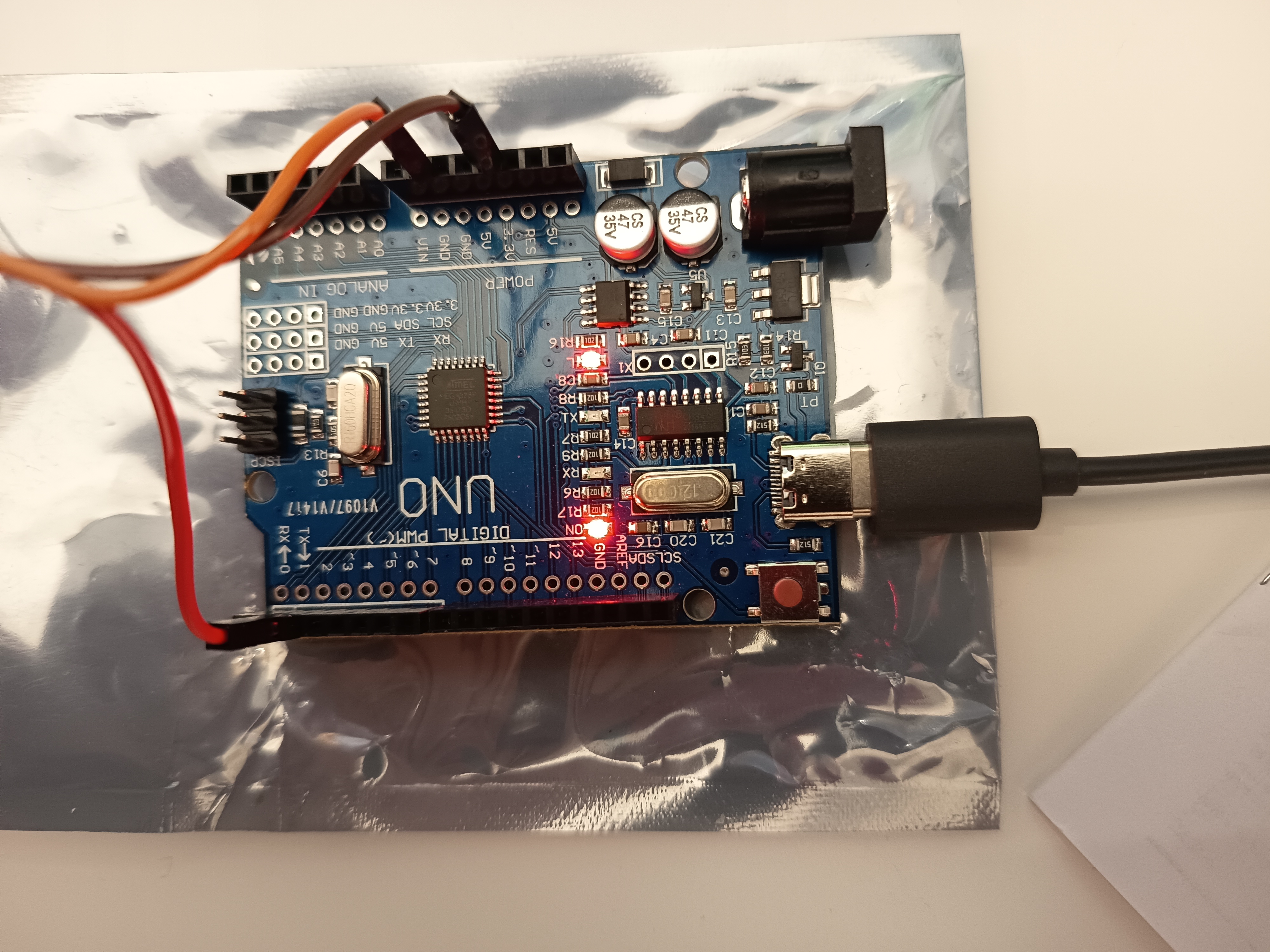
Áramkőr összeállítás
A szenzor VCC-re 3.3V-ot, a GND-re 0V-ot kell kötni. A mért adatok a DQ PIN-en érhetőek el, amit az alaplap valamelyik GPIO PIN-jére kell csatlakoztatni, én a 2. PIN-t használtam.
Kódok
using System.IO;
using System.IO.Ports;
using System.Text;
using System.Windows;

namespace IndoorThermometer.Classes
{
    public class ThermoMeter
    {
        private SerialPort _serialPort;
        static StringBuilder _buffer = new StringBuilder();
        public double temperature { get; set; }

        public ThermoMeter(string portName, int speed)
        {
            _serialPort = new SerialPort(portName, speed);
            _serialPort.DataReceived += SerialPort_DataReceived;
            _serialPort.Open();
        }

        public void ClosePort() { _serialPort.Close(); }

        private void SerialPort_DataReceived(object sender, SerialDataReceivedEventArgs e)
        {
            int count = 0;
            try
            {
                SerialPort sp = (SerialPort)sender;
                string data = sp.ReadExisting();
                _buffer.Append(data);

                // Soronként dolgozzuk fel
                string content = _buffer.ToString();
                int index;
                while ((index = content.IndexOf('\n')) >= 0)
                {
                    string line = content.Substring(0, index).Trim();
                    if (!string.IsNullOrEmpty(line))
                    {
                         if (double.TryParse(line,
                            System.Globalization.NumberStyles.Any,
                            System.Globalization.CultureInfo.InvariantCulture,
                            out double tempValue))
                        {
                            temperature = tempValue;
                            count++;
                        }

                    }

                    content = content.Substring(index + 1);

                }

                _buffer.Clear();
                if (content.Length > 500) { content = content.Substring(0, 500); }
                _buffer.Append(content);
            }
            catch (IOException ioEx)
            {
                MessageBox.Show(ioEx.Message, "I/O Error", MessageBoxButton.OK, MessageBoxImage.Error);
            }
            catch (InvalidOperationException invEx)
            {
                MessageBox.Show(invEx.Message, "Port is not available!", MessageBoxButton.OK, MessageBoxImage.Error);
            }
        }
    }
}
Magyarázat
Soros porton érkező hőmérséklet-adatok feldolgozása
A bemutatott kódrészlet egy soros porton érkező adatok valós idejű feldolgozását valósítja meg. Tipikusan ilyen megoldást alkalmazunk például mikrovezérlőkkel (pl. Arduino) kommunikáló asztali alkalmazásokban, ahol az eszköz folyamatosan küld mérési adatokat.Eseményalapú működés
A SerialPort_DataReceived metódus akkor fut le, amikor a soros porton új adat érkezik. Az eseménykezelő automatikusan meghívódik, így az alkalmazás folyamatosan, megszakítás nélkül képes feldolgozni a bejövő adatfolyamot.Adatok beolvasása és pufferelése
A soros porton érkező adatok nem feltétlenül teljes sorokban érkeznek meg, ezért a kód egy belső pufferben (_buffer) gyűjti őket:- ReadExisting() metódus az adott pillanatban elérhető összes karaktert beolvassa
- Az adatokat egy StringBuilder objektumhoz fűzi hozzá
- Ez biztosítja, hogy a részlegesen érkező sorok se vesszenek el
Soronkénti feldolgozás
A feldolgozás sorhatároló (\n) alapján történik:- A kód megkeresi az első sortörést
- A sort leválasztja és megtisztítja a felesleges szóközöktől
- Az üres sorokat figyelmen kívül hagyja
Numerikus érték értelmezése
Minden feldolgozott sor esetén a program megpróbálja:- lebegőpontos számmá (double) alakítani az adatot
- kultúrafüggetlen formátumban (InvariantCulture), így a tizedesjel mindig pont (.)
- az érték eltárolásra kerül (temperature)
- egy számláló növekszik, amely a feldolgozott adatok számát követi
Puffer karbantartása
A feldolgozott sorok eltávolítása után:- a puffer törlésre kerül
- az esetlegesen félbeszakadt (hiányos) sor visszakerül a pufferbe
- a puffer maximális mérete 500 karakterre van korlátozva, ezzel megelőzve a memória túlzott növekedését
Hibakezelés
A kód két gyakori hibát kezel le:- I/O hiba például ha megszakad a kapcsolat az eszközzel
- Érvénytelen állapot például ha a soros port nincs megnyitva
Összegzés
Ez a megoldás:- megbízhatóan kezeli a folyamatos adatáramlást
- nem feltételezi, hogy az adatok egyszerre érkeznek meg
- kultúrafüggetlen módon dolgozza fel a numerikus értékeket
- stabil működést biztosít hibakezeléssel és pufferkontrollal
C# Project letöltés
Letöltés